To move the tags box from the top right corner to the bottom:
<div class='tagged...
Must be moved below <div class='viewer... And above <div class='tagClear...
Tuesday, November 24, 2009

Sunday, November 1, 2009
v0.3.2 available for download
v0.3.2 features:
* Logging - Save game notes with xp, hp context
* Equipment - Magic items may have skill, ability, or other (fort, att, ac, etc) numerical benefits
* Monk special abilities - Flurry of blows
* Rogue special abilities
* Spell data complete
* Skill data complete
* Special ability (non-operational) data complete
Plenty of bug fixes (and probably plenty introduced).
Taking a break until I get a superphone, or even one human being besides myself shows some interest.
* Logging - Save game notes with xp, hp context
* Equipment - Magic items may have skill, ability, or other (fort, att, ac, etc) numerical benefits
* Monk special abilities - Flurry of blows
* Rogue special abilities
* Spell data complete
* Skill data complete
* Special ability (non-operational) data complete
Plenty of bug fixes (and probably plenty introduced).
Taking a break until I get a superphone, or even one human being besides myself shows some interest.
Tuesday, October 6, 2009
v0.3 available for download
After fixing the Load character data functionality, I felt a small celebration was in order. Thus a new zip is available for download. This release has some boring improvements, like Special Abilities (though this isn't data-complete) and more spell and skill data, but the major change was a refactoring of how weapon and armor selector work on the edit page.
Javascript's flexible typing and giant hash object reference model(?) lets you do some neat tricks to reuse code. Essentially you can pass in the string names of attributes or functions to be acted on, rather than defining interfaces as you would in Java. For example, weapons and armor have a similar structure, and the edit UI for both behaves in exactly the same way. Some stuff about the code below.
For 0.4, I'll refactor the steaming pile that is feats.
Javascript's flexible typing and giant hash object reference model(?) lets you do some neat tricks to reuse code. Essentially you can pass in the string names of attributes or functions to be acted on, rather than defining interfaces as you would in Java. For example, weapons and armor have a similar structure, and the edit UI for both behaves in exactly the same way. Some stuff about the code below.
function populate_data_part(chardata, data_name, id_name) {
 for (var j in chardata[data_name]) {
  var item = window[data_name].first( {
   id : chardata[data_name][j][id_name + '_id']
  });
  $("#" + id_name + "_" + j + " option[id='" + id_name + "_" + j + "_option_" + item.id + "']").attr("selected", true);
  // TODO - this part might be better in recalc
  for(var i in window[id_name + "_edit_data"]) {
   var edit_attr_name = window[id_name + "_edit_data"][i];
   var value = chardata[data_name][j][edit_attr_name] == null ? item[edit_attr_name] : chardata[data_name][j][edit_attr_name];
   $("#" + id_name + "_" + j + edit_attr_name).val(value == null ? "" : value);
  }
 }
}
For 0.4, I'll refactor the steaming pile that is feats.
Saturday, October 3, 2009
Windows 7 window tricks in XP
The most (only?) compelling feature of Windows 7 for me is the automatic window resizing. When you grab a window and bang it against an edge, the window is resized to fill half the screen (either horizontally or vertically).
You can get the same functionality for XP with PowerResizer. Brilliant.
You can get the same functionality for XP with PowerResizer. Brilliant.
Tuesday, September 22, 2009
Motorola Razr V3 keys not working
I had to look around for a bit to find the answer, so maybe this will save somebody some time:
The keys (except for the red on/off button) on my Motorola Razr V3 stopped working during our trip to the beach. Turns out the phone is sensitive to humidity, so putting the phone on the air conditioning vent for a little bit got it working again.
The keys (except for the red on/off button) on my Motorola Razr V3 stopped working during our trip to the beach. Turns out the phone is sensitive to humidity, so putting the phone on the air conditioning vent for a little bit got it working again.
Friday, August 21, 2009
Safari Books Online
I recently got a Safari Books subscription from work, and it is awesome. I don't enjoy reading long form content on the computer screen, but having access to concise, correct examples and solutions is a revelation when compared to sifting through the Google.
I loathe subscription fees but access to this technical library would be worth it, even if I had to (ugh) pay for it myself.
I loathe subscription fees but access to this technical library would be worth it, even if I had to (ugh) pay for it myself.
Monday, August 17, 2009
Javascript Development Environment
Doing this for a couple weeks, I now have a stable environment for javascript development:
Eclipse 3.5 - Web Tools, XML Tools, Javascript, Subclipse
Firefox - Firebug
Chrome
Development is leagues away from the effortless task of Java development, where Eclipse gives such an enormous lift it's hard to adjust to the basic help you get with dynamic languages. The Javascript editor is very good, but because of the language, there are no sophisticated refactoring tools included. This important, especially when working on a new project, because you learn the specifics of the problem domain as you go. With Java + Eclipse, agile development of sort "get it to work, get it work right, get it work fast" is perfectly natural.
In any case, Firebug is immensely powerful as a debugging tool. Critically, it has mouseover variable information. There are some bridges between Eclipse and Firebug, but I could not get them to reliabily work on Linux, so it's: make a small change in the IDE, switch to Firefox reload, inspect. Firebug has one annoying bug in that it shows errors in red over the top of the text of the line that is causing the problem. If your lines are long you can't read them. So I load the page in Google Chrome and inspect the code in its very pretty but less sophisticated debugging environment, and get the error in the console. Chrome is also damned fast, and formats things slightly different, so it useful if only as a second opinion.
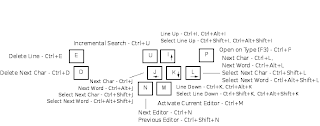
Even if Eclipse had no Javascript editor, context help, large file support, great search capabilities, intuitive diff comparison, unparalleled Team support, SVN integration, or Mylyn task tracking, its ludicrously configurable keybindings have me hooked. I've configured a rational homerow editor navigation scheme that makes all others (emacs, vi, etc) blush in shame:
(I'm happy to send the key prefs to any who request it).
Eclipse 3.5 - Web Tools, XML Tools, Javascript, Subclipse
Firefox - Firebug
Chrome
Development is leagues away from the effortless task of Java development, where Eclipse gives such an enormous lift it's hard to adjust to the basic help you get with dynamic languages. The Javascript editor is very good, but because of the language, there are no sophisticated refactoring tools included. This important, especially when working on a new project, because you learn the specifics of the problem domain as you go. With Java + Eclipse, agile development of sort "get it to work, get it work right, get it work fast" is perfectly natural.
In any case, Firebug is immensely powerful as a debugging tool. Critically, it has mouseover variable information. There are some bridges between Eclipse and Firebug, but I could not get them to reliabily work on Linux, so it's: make a small change in the IDE, switch to Firefox reload, inspect. Firebug has one annoying bug in that it shows errors in red over the top of the text of the line that is causing the problem. If your lines are long you can't read them. So I load the page in Google Chrome and inspect the code in its very pretty but less sophisticated debugging environment, and get the error in the console. Chrome is also damned fast, and formats things slightly different, so it useful if only as a second opinion.
Even if Eclipse had no Javascript editor, context help, large file support, great search capabilities, intuitive diff comparison, unparalleled Team support, SVN integration, or Mylyn task tracking, its ludicrously configurable keybindings have me hooked. I've configured a rational homerow editor navigation scheme that makes all others (emacs, vi, etc) blush in shame:

(I'm happy to send the key prefs to any who request it).
Subscribe to:
Posts (Atom)